Quick answer
- A WhatsApp chatbot is software that automatically answers the messages your WhatsApp number receives, in seconds, at any hour.
- Rule-based bots send replies you wrote in advance; AI chatbots understand free text and answer from your own business information.
- It connects through Meta’s Business API (official, per-message fees) or as a linked device by QR code (no Meta fees, no broadcasts).
What is a WhatsApp chatbot?
A WhatsApp chatbot is software that automatically replies to the messages a WhatsApp number receives. Customers chat with it the way they chat with a person, and it answers in seconds, at any hour, so questions about prices, stock, delivery, or opening times don’t wait for someone to pick up the phone.
There are two kinds, and the difference matters more than any feature list:
| Rule-based chatbot | AI chatbot | |
|---|---|---|
| How it understands | Matches keywords, numbers, or button taps | Reads the whole message in plain language |
| How it answers | Sends replies you wrote in advance | Writes a reply from your instructions and knowledge base |
| Typos, slang, other languages | Usually breaks | Handles them |
| Questions you didn’t plan for | “Sorry, I didn’t understand” | Answers if the information is in its knowledge base |
| Setup | Draw every path of the flow | Write instructions, upload documents |
| Best for | Fixed menus and forms | Customer questions in any wording |
Rule-based bots are menus: “Reply 1 for prices, 2 for delivery.” They work until a customer types something the menu didn’t expect, which is most of the time. AI chatbots use a large language model, such as OpenAI’s GPT or Anthropic’s Claude, to understand the question and write an answer, and a knowledge base to make sure that answer comes from your information rather than a guess.
How a WhatsApp chatbot works
Behind every reply, the same five things happen, usually in a second or two:
- A customer messages your number, for example “Do you deliver to Pune, and can I pay cash?”
- The message reaches the chatbot software, through Meta’s Business API or through a linked device (more on that below).
- The bot looks up what it needs. An AI chatbot searches your knowledge base, the price list, delivery rules, and FAQ you gave it, for the parts that match the question.
- It writes the reply, following your instructions: answer in the customer’s language, keep it short, never invent prices.
- The reply lands in the same chat, and the conversation is saved so you can read it and step in yourself.
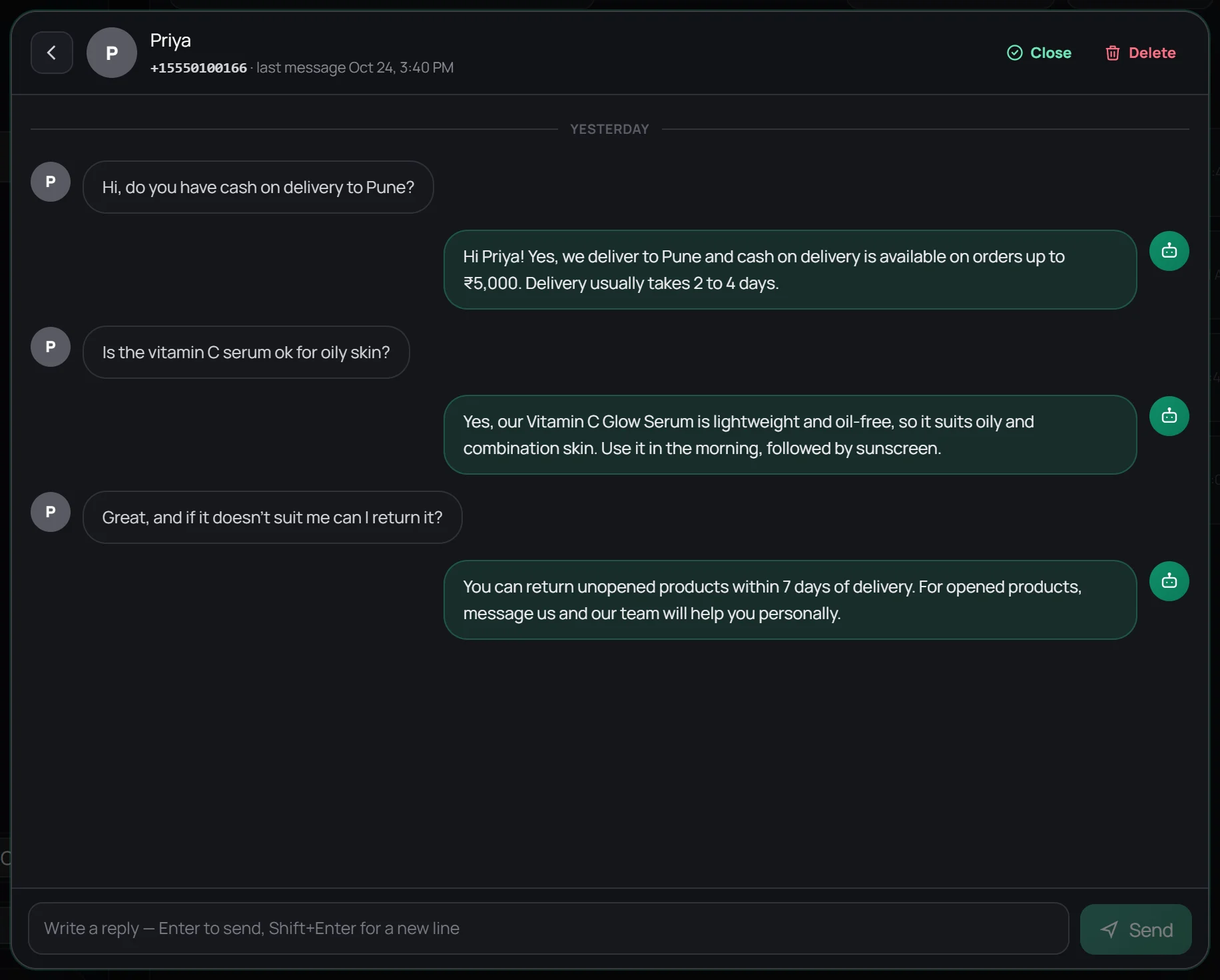
Some chatbots can also take actions mid-conversation, such as looking up an order in your store or checking a free slot in a calendar, by calling your systems through an API. That part needs your systems to have an API; the answering part doesn’t.
Where the chatbot plugs in: API or linked device
Step 2 hides the biggest choice you’ll make. There are two ways to connect software to a WhatsApp number:
| WhatsApp Business API | Linked device (QR code) | |
|---|---|---|
| How the bot connects | Your number is registered on Meta’s WhatsApp Business Platform, usually through a provider | Your number is linked as a device with a QR code, like WhatsApp Web |
| Meta’s message fees | Yes, per message, by country and category | None |
| Broadcasts to big lists | Yes, with approved templates | No |
| Keep using the WhatsApp app | Only with Meta’s coexistence setup | Yes |
| Official Meta route | Yes | No |
The API is Meta’s official route and the right one for broadcasts at scale. The linked-device route is faster and has no Meta fees, which suits businesses whose WhatsApp is mostly customers asking questions. The full trade-off is in WhatsApp Business app vs API. For voice calls, Meta’s official route is the WhatsApp Business Calling API, and the WhatsApp Business app now has an AI agent of its own, Meta Business Agent.
WhatsApp chatbot examples by industry
What a chatbot handles depends on what your customers ask. Six common setups:
Online store
Stock, sizes, delivery areas and times, cash on delivery, and returns, which make up most of a store’s WhatsApp. A good store bot answers these from the catalogue and policies, and leaves refunds and complaints to a person.
“Is the vitamin C serum good for oily skin, and can I pay on delivery?” → “Yes, it’s oil-free and suits oily skin. Cash on delivery is available on orders up to ₹5,000.”
Clinic or dental practice
Opening hours, consultation fees, which doctor sees what, and how to prepare for a visit. The bot can collect booking requests; confirming a slot automatically needs a connection to your booking system. WhatsApp appointment booking shows both setups.
Restaurant
Menu questions, vegetarian and allergy options, delivery radius, and table requests, answered from the menu you upload, at the hours people actually ask: late evening. A bot can take the order itself, too: see WhatsApp food ordering.
Real estate
Answers about listings, price, location, and amenities, plus a few qualifying questions (budget, area, move-in date) before an agent calls. See AI for real estate.
Coaching and education
Course fees, batch timings, syllabus, and demo-class requests, the same ten questions every parent asks, in every language they ask in.
Local services
Salons, repair shops, and travel agents: prices, availability, and directions, with anything unusual handed to the owner. For tone and handoff rules, see a calmer WhatsApp workflow.
What chatbots do well, and where they fail
- Replies in seconds, day and night
- Gives the same correct answer every time
- Answers in the customer’s language
- Clears the repeat questions so people handle the hard ones
- Keeps every conversation saved and searchable
- Only as good as its knowledge base: missing info means vague answers
- Upset customers usually want a person
- Needs a weekly read-through to stay sharp
- Unofficial routes put a number at risk if you use them to spam
- Text bots don’t answer voice notes or images
The failure that hurts most is a confident wrong answer. Prevent it with one line in the instructions, “if the knowledge base doesn’t say, tell the customer a person will reply”, and by adding an answer to the knowledge base every time you spot a gap.
How much does a WhatsApp chatbot cost?
The bill has up to three parts, and comparisons that show only the first are misleading:
- The platform’s plan. Most chatbot platforms charge monthly, often with AI agents or the chatbot builder as paid add-ons. Our WATI alternatives list compares real prices.
- Meta’s message fees, if the platform uses the Business API. Meta charges per delivered template message, and since 1 October 2026 also for service replies beyond 1,000 a month per number. The rates by country are in WhatsApp Business API pricing.
- AI usage. Some platforms count AI replies separately or ask for your own OpenAI key, so a busy month costs more.
Wapzen is currently free, with the AI models (GPT and Claude) included and no keys of your own. It links your number by QR code rather than the Business API, so Meta’s message fees don’t apply either. See the pricing page.
How to set one up in about 15 minutes
With Wapzen, the whole setup is four steps:
- Make a knowledge base. Paste or upload your price list, delivery and payment rules, return policy, and FAQ (text, PDF, or Word).
- Create a chat agent. Write a short system prompt: who it works for, what it helps with, and its rules. Pick a GPT or Claude model and attach the knowledge base.
- Connect your number. Scan a QR code from WhatsApp’s Linked devices screen and choose the agent for that number.
- Test it, by messaging your number from another phone with the questions customers ask most.
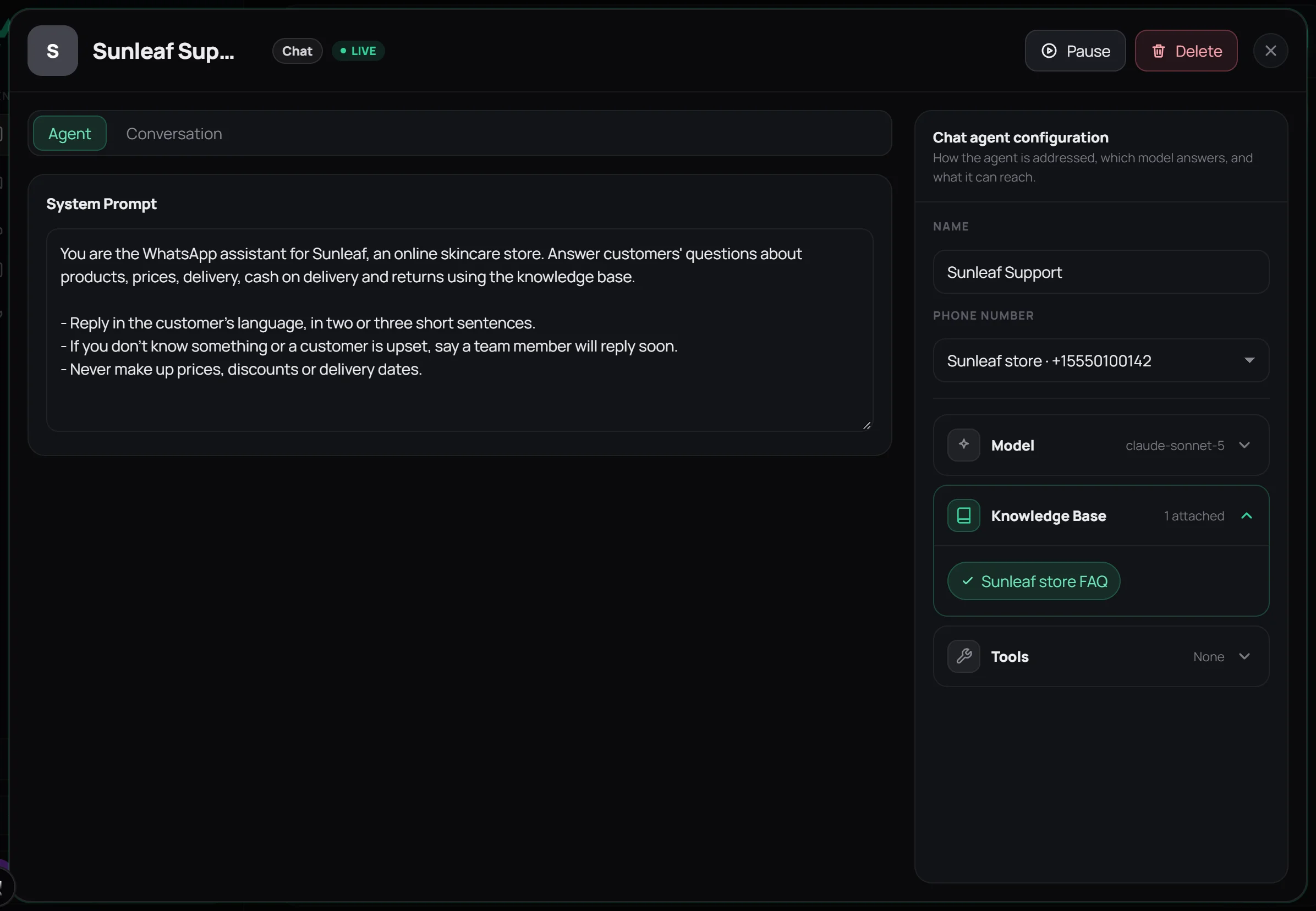
The step-by-step version with every screen is How to create a WhatsApp chatbot without the Business API. If you’d rather build it yourself, the n8n guide shows that route.
Does your business need one?
A chatbot pays off quickly if two or more of these are true:
- You answer the same ten questions every day.
- Messages arrive after hours and wait until morning.
- Customers buy from whoever replies first, so slow replies cost sales.
- You get questions in more than one language.
If you get a handful of messages a day and each one is a custom quote, the free away message in WhatsApp Business and a good greeting message may be all you need for now.
Wapzen is an independent product, not made by Meta or WhatsApp. It links your number as a linked device. Use the chatbot to answer people who message you, never to message people who didn’t: WhatsApp restricts numbers that send bulk or unwanted messages.
Frequently asked questions
What is a WhatsApp chatbot in simple words?
It's software that answers the messages your WhatsApp number receives, so customers get a reply in seconds even when nobody is at the phone. Simple chatbots send replies you wrote in advance; AI chatbots read the question and write an answer from your business information.
How does a WhatsApp chatbot work?
A customer messages your number. The message reaches the chatbot software, either through Meta's WhatsApp Business API or through a linked device. A rule-based bot matches a keyword or button and sends a stored reply; an AI bot searches your knowledge base and writes an answer with a language model. The reply goes back to the customer in the same WhatsApp chat.
Is a WhatsApp chatbot free?
WhatsApp doesn't charge for chatbots as such, but the official Business API charges per message: for templates, and since 1 October 2026 also for service replies beyond 1,000 a month per number. Providers add their own plans. Wapzen is currently free, including the AI models, and it doesn't use the Business API, so there are no Meta message fees.
Do I need the WhatsApp Business API for a chatbot?
No. You can link an existing WhatsApp or WhatsApp Business number as a device with a QR code, and an AI agent answers the messages it receives. The API is the better route if you need bulk broadcasts, a large team inbox, or Meta's official platform.
Can a WhatsApp chatbot answer voice notes and calls?
Most text chatbots answer text only. Wapzen's chat agent answers one-to-one text messages, not voice notes, images, or group chats. For calls, a separate AI voice agent can answer and make WhatsApp calls on the same number.
Is a WhatsApp chatbot the same as Meta AI?
No. Meta AI is Meta's own general assistant inside WhatsApp for personal use. A business chatbot answers your customers on your number, using your prices, policies, and instructions.
Will customers know they're talking to a bot?
They should. Tell the chatbot to introduce itself as your store's assistant and to say when a person will follow up. Customers mind slow or wrong answers far more than they mind a clearly labelled assistant.