Quick answer
- Personal WhatsApp has no built-in auto reply, on Android or iPhone.
- Simplest fix: move the number to the free WhatsApp Business app and turn on an away message. It sends the same fixed text to everyone.
- For real answers: link your number to an AI agent like Wapzen with a QR code. It replies to each message from the cloud, keeps you on the regular app, and is free right now.
Does personal WhatsApp have auto reply?
No. The regular WhatsApp app, on Android or iPhone, has no away message, greeting message, or auto reply setting. Those live in the separate WhatsApp Business app. That leaves three ways to answer people automatically while you’re busy, asleep, or away:
| WhatsApp Business app | Android auto-reply app | AI agent (Wapzen) | |
|---|---|---|---|
| Works on | Android and iPhone | Android only | Android and iPhone |
| Keeps the regular WhatsApp app | No, the number moves to WhatsApp Business | Yes | Yes |
| What it sends | One fixed message | Fixed text or keyword rules | A written answer to each message |
| Answers questions | No | Only ones you wrote rules for | Yes, from your instructions |
| Phone must be online | Yes | Yes, with notifications on | No |
| Cost | Free | Free, with paid upgrades | Free right now |
If one polite “I’ll get back to you” is enough, the Business app is the simplest. If people ask you the same questions (prices, availability, where you are), an AI agent can answer them properly. The sections below walk through each method.
Method 1: Switch to WhatsApp Business
WhatsApp Business is free, runs on the same phone number, and can bring your chats across when you switch. Once your number is in WhatsApp Business, it’s no longer on the regular app, so this is a real move, not an add-on.
- Install WhatsApp Business and verify your existing number. It offers to transfer your chat history from WhatsApp.
- Open Settings on iPhone, or More options on Android, then Business tools › Away message.
- Turn on “Send away message” and write your message.
- Pick a schedule (always, a custom schedule, or outside business hours) and the recipients, then tap Save.
The away message is the same text for everyone, and it only goes out while your phone has an internet connection. For wording ideas, copy one of the WhatsApp auto reply samples.
Method 2: An auto-reply app on Android
Android apps such as AutoResponder for WA or WhatsAuto read your incoming WhatsApp notifications and answer through the notification’s reply button. You keep the regular WhatsApp app and set rules like “reply to everyone” or “reply when the message contains price”.
They work, with limits worth knowing before you install one:
- Android only. iPhone doesn’t let apps reply to another app’s notifications.
- Your phone has to be on, online, and showing WhatsApp notifications. Battery savers that close the app stop the replies.
- They need notification access, which means they can read every notification on your phone, not just WhatsApp’s.
- Replies are rules you write. Some apps add AI replies as a paid extra.
These apps are made by third parties, not by WhatsApp.
Method 3: AI auto reply with Wapzen, step by step
Wapzen links your number the way WhatsApp Web does and runs an AI chat agent on it. Instead of a fixed away message, every person who messages you gets a short, written answer to what they actually asked. You keep the regular WhatsApp app on your phone. It’s free right now, and the screenshots below are from the real dashboard with a demo account: Maya, a photographer, who gets booking questions while she’s out on shoots.
1. Create a free account
Click Start free at the bottom of this page. There’s no card and no WhatsApp Business API to apply for.
2. Create a chat agent and tell it what to say
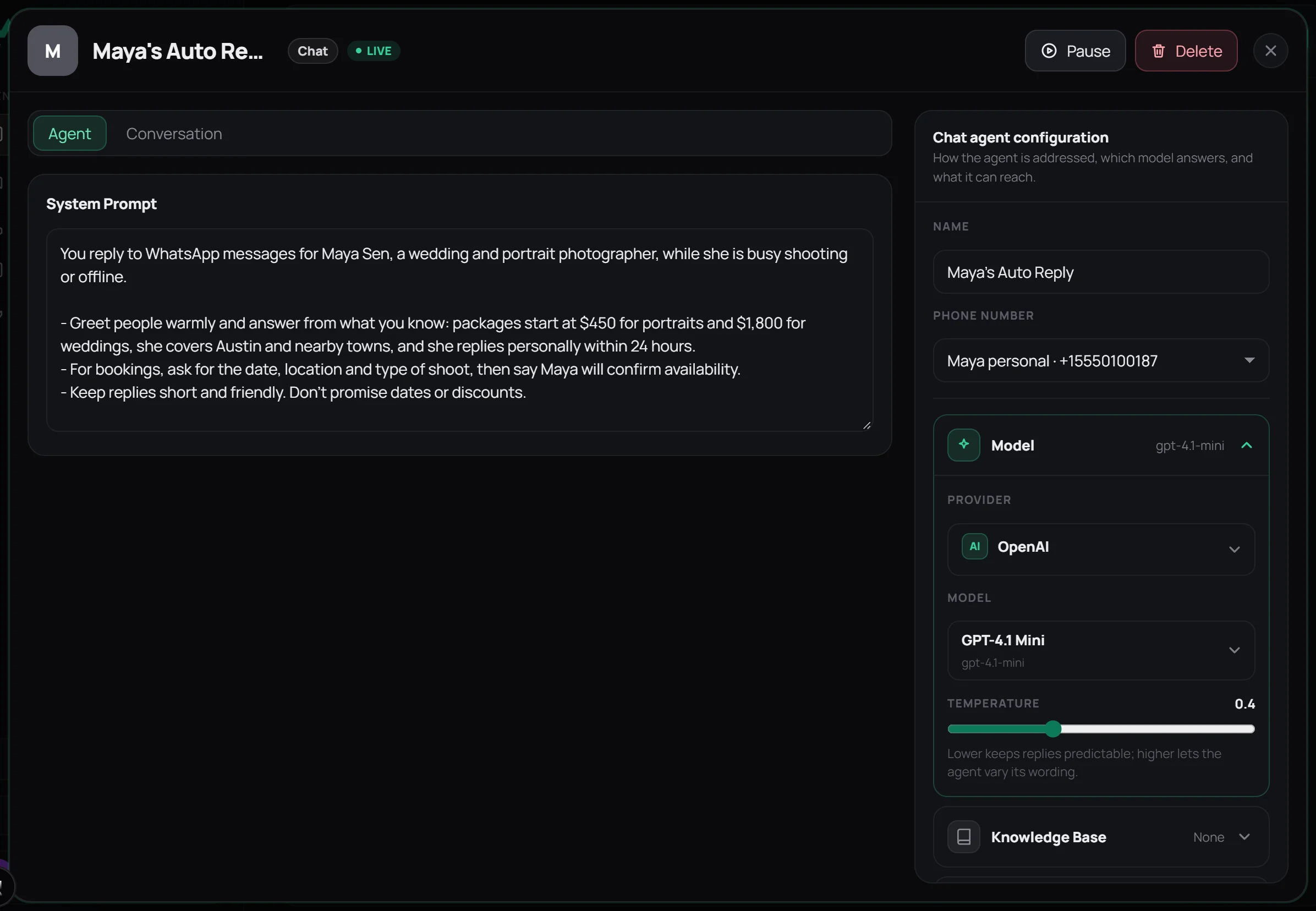
Switch the dashboard to Chat, open Chat Agents, and click New chat agent. The system prompt is where the agent learns who you are and what it may say. A good one covers three things:
- Who it speaks for and that you’re away: “You reply for Maya Sen, a wedding and portrait photographer, while she’s busy shooting.”
- The facts people ask about: prices, area, hours, how fast you reply.
- What not to promise: dates, discounts, anything you want to confirm yourself.
3. Link your WhatsApp number with a QR code
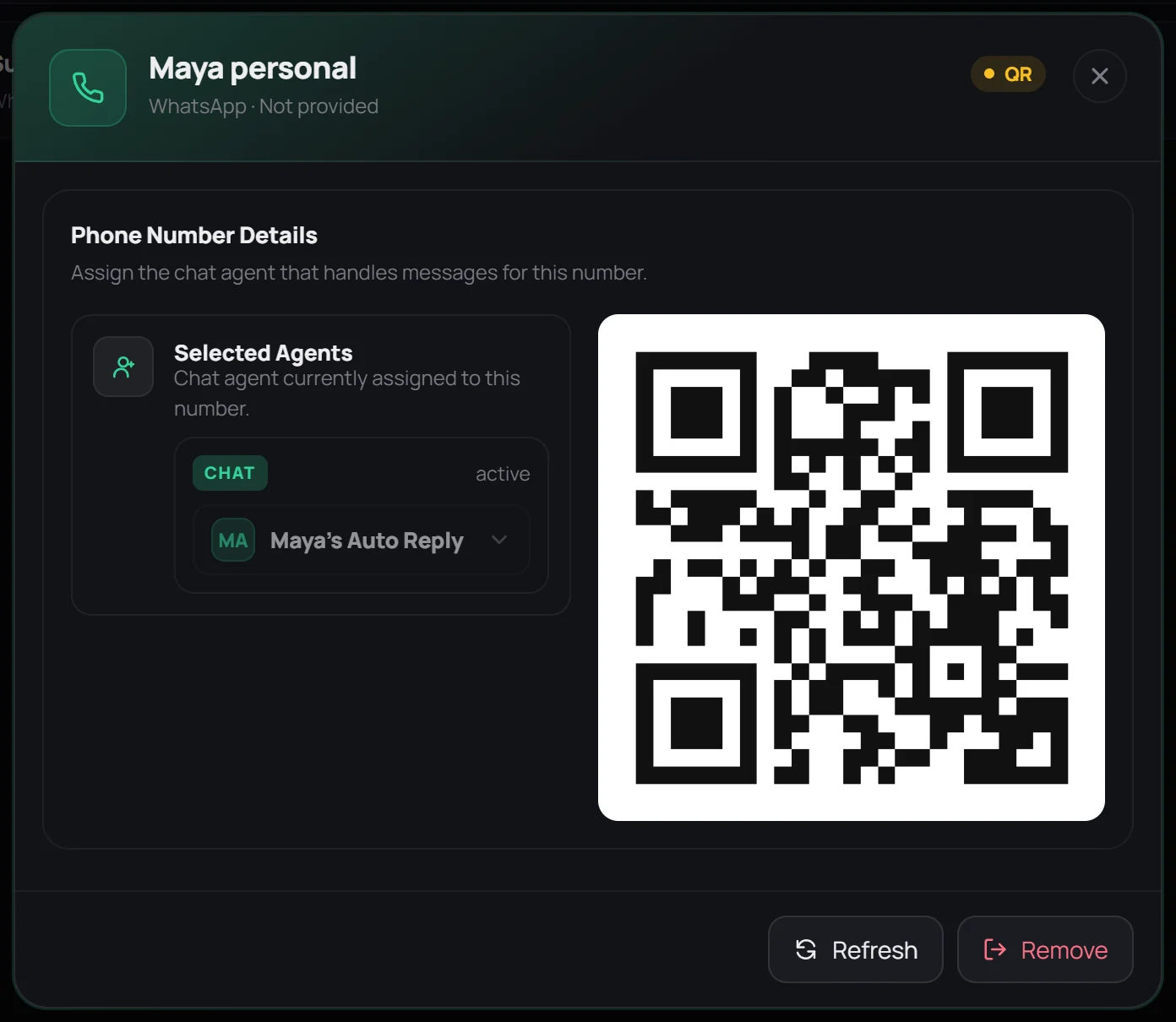
Open Phone Numbers, click New Number, give it a label, and click Create. A QR code appears. On your phone, open WhatsApp and go to Settings › Linked devices on iPhone, or ⋮ › Linked devices on Android, tap Link a device, and scan it. In the same window, pick your chat agent under Selected Agents.
4. Switch the agent on and test it
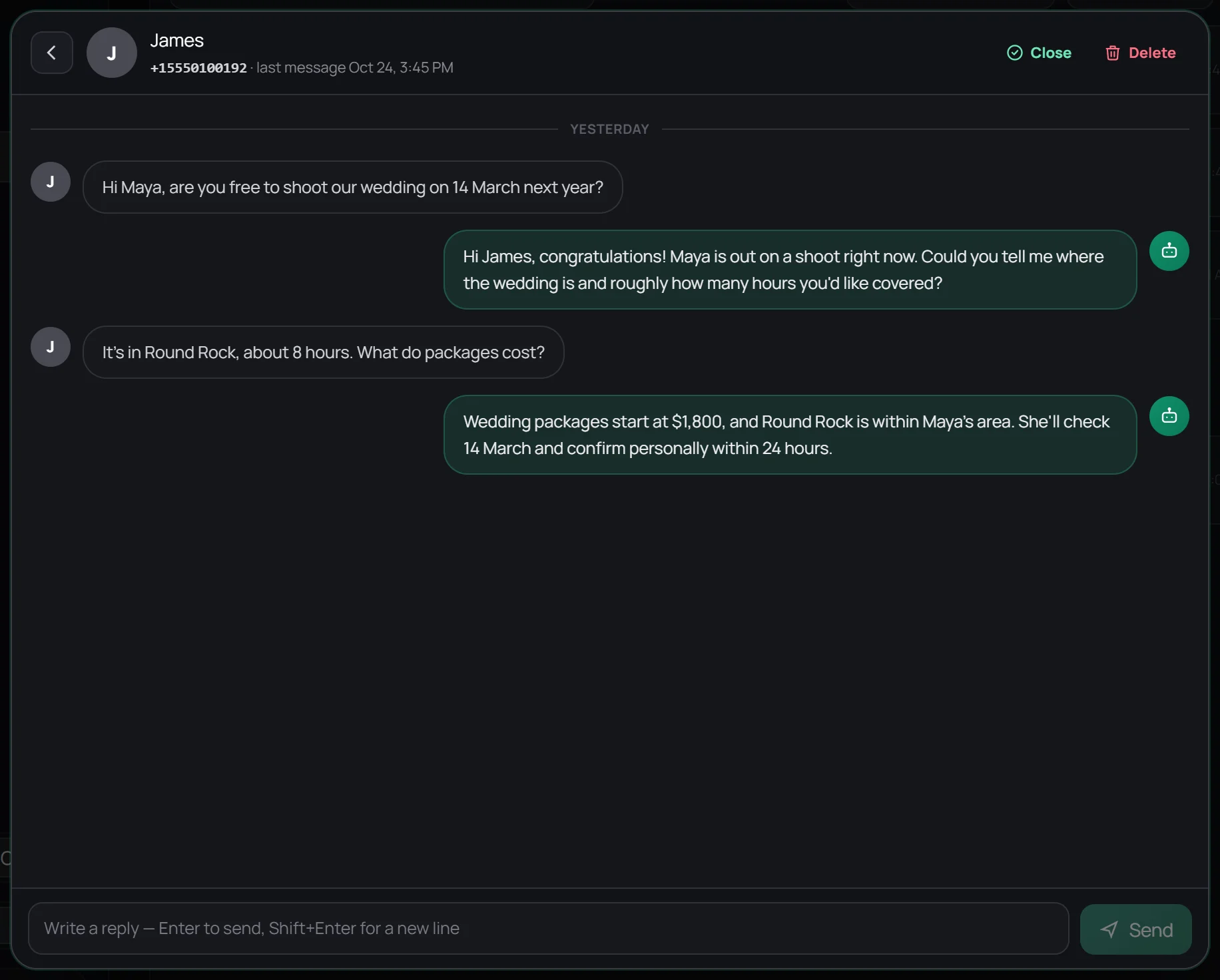
Back in the agent, click Activate so it shows as Live. Then message your number from another phone. Within a few seconds you’ll get an answer, and the whole thread appears under Conversations, where you can read what the agent said and reply yourself.
Before you switch AI auto reply on
- It answers everyone who messages you one-to-one, friends and family included, but never posts in groups. It works best on the number you use for work. Click Pause in the agent when you’re back.
- It answers text messages. Voice notes and photos still reach your phone as usual but don’t get an AI reply.
- Your phone can be off. Replies come from the cloud, not your phone. Open WhatsApp on your phone at least every couple of weeks, because WhatsApp signs out linked devices on a phone that hasn’t been used for a while.
- Wapzen isn’t made by WhatsApp. It links your number as a linked device, like WhatsApp Web. Use it to answer people who contact you, not to send bulk messages, which breaks WhatsApp’s terms on any account.
Want the agent to answer WhatsApp calls too? The same number can have a voice agent. See the AI receptionist page.
Frequently asked questions
Can I set auto reply on normal WhatsApp?
Not inside the app. Regular WhatsApp has no away message or auto reply setting on Android or iPhone. You can move the number to the free WhatsApp Business app, use an Android auto-reply app, or link the number to an AI agent such as Wapzen, which keeps you on regular WhatsApp.
How do I set auto reply on WhatsApp on iPhone?
iPhone has no auto-reply apps for WhatsApp, because iOS doesn't let apps reply to other apps' notifications. Your options are the WhatsApp Business app's away message, or linking your number to Wapzen by QR code from WhatsApp's Linked devices screen, which works the same on iPhone.
How do I set auto reply in WhatsApp without a business account?
Link your personal number to an AI agent. In Wapzen you create a chat agent, scan a QR code from WhatsApp's Linked devices screen, and switch the agent on. Your number stays a personal account and you keep using the regular app.
Does WhatsApp auto reply work when my phone is off?
The WhatsApp Business away message and Android auto-reply apps both need your phone online. A linked AI agent replies from the cloud, so it keeps answering while your phone is off. Open WhatsApp on your phone at least every couple of weeks, or WhatsApp signs linked devices out.
Will people know the reply is automatic?
They see a normal message from your number. We'd recommend saying so: tell the agent in its instructions to introduce itself as your assistant. People are more forgiving of an assistant than of a reply that pretends to be you.
Will the AI reply in my WhatsApp groups?
No. Wapzen's chat agent only answers one-to-one chats and never posts in groups. It does answer everyone who messages you one-to-one, so pause it when you're back or use it on the number you use for work.